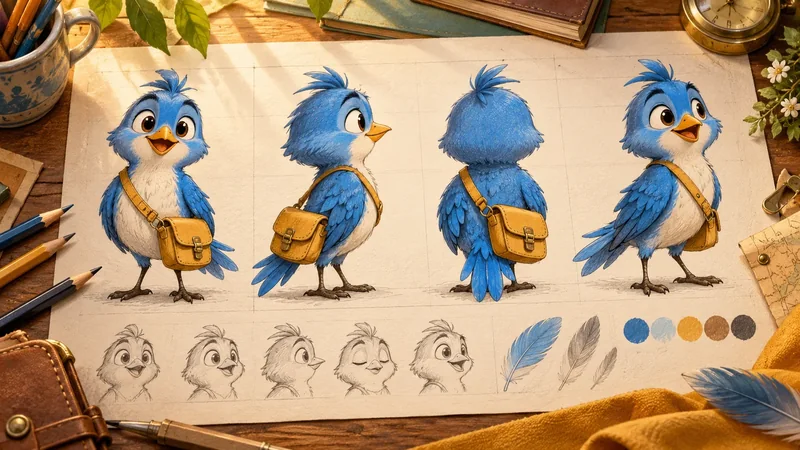
What is a character turnaround sheet?
A turnaround shows the same character in aligned front, side, back and three-quarter views. Consistent proportions and construction help modelers understand volume and details. Add expression, pose and material notes where needed, and resolve contradictory views before treating the sheet as a modeling reference.
Continue with 3D Character Design: Concept to Model and Cartoon Character Rigging Explained.
How can one cartoon character look unmistakably the same from the front, side, back, and every angle in between?
A character turnaround sheet gives artists a shared answer before the first polygon is modeled. It translates an appealing concept sketch into consistent views, proportions, shapes, and notes that a 3D team can actually use. For a stylized character, this matters especially: a small change to the eyes, head depth, ears, or costume can alter the personality when the model rotates.
This guide walks through what to include, how to keep the views aligned, and how to hand the sheet to modelers and riggers. It is written for creators, producers, and brand teams commissioning cartoon characters for film, games, apps, campaigns, or children's series.
Table of Contents
What a character turnaround sheet does in production
A character turnaround sheet is a set of coordinated drawings that shows one character from multiple angles. Front and side views are the practical minimum for many modeling tasks; a three-quarter view communicates personality and volume, while a back view resolves shapes that the camera cannot see in the front drawing. Some teams also include top or detail views when hair, hats, wings, backpacks, or other complex forms need clarification.
The sheet is a production reference, not a beauty illustration. Its job is to answer concrete questions: How deep is the head? Where do the ears attach? Does the jacket wrap around the torso? Are the shoes symmetrical? A modeler should be able to compare the drawings and build one coherent object without inventing a different design at every angle. A beautiful front pose alone cannot answer those questions.
Think of the sheet as a bridge between cartoon character design and 3D character modeling. It establishes visual decisions early enough to change them cheaply. The team can still refine surface detail in 3D, but a clear approved turnaround protects the silhouette and the traits that make the character recognizable.
Different projects require different precision. A small social mascot may need a clean basic sheet and a few facial notes. A lead character appearing in close-ups, games, and merchandise needs more views, material callouts, expression references, and an approval process. Start with the character's intended use rather than filling a generic template.
Lock the brief, silhouette, and proportions first
Before drawing every angle, define what the character must communicate. Write a short brief covering audience, role, personality, style, wardrobe, props, and where the asset will appear. A preschool hero may need simple shapes and easy-to-read expressions. A game companion may need clear recognition at a small on-screen size. A branded avatar may need colors and features that remain consistent across many campaigns.
Explore the silhouette in small sketches before committing to details. Compare head-to-body ratios, shoulder width, hand and foot scale, and the outline of hair or clothing. Turn the sketch into a flat black shape: can the character still be recognized? If every feature depends on a front-facing face or decorative pattern, the design may disappear when rotated. Mimic Cartoon's guide to good cartoon character design explains why shape language and readability matter beyond a single polished render.
Choose a neutral stance for the turnaround. Arms should leave enough space to see the torso and hands, legs should reveal their shapes, and the head should face straight ahead in the front view. A neutral stance is not the character's acting pose; it is a measuring position. Keep an expressive pose separately so technical drawings do not erase personality.
Set a few reference lines before redrawing: top of head, eye line, chin, shoulders, hips, knees, and ground. Note the character's height in heads or another proportion system. These guides are more useful than a long list of arbitrary measurements because they help different views agree. Keep the same scale and baseline on one canvas, and resist resizing individual views to make them look prettier.
Draw front, side, three-quarter, and back views consistently
Begin with a front view that makes the approved proportions unambiguous. Check symmetry where the design is meant to be symmetrical, and mark deliberate asymmetry such as a hair part, pocket, patch, or accessory. Do not mirror an asymmetric feature by accident in the back view. Put the eye line, shoulder line, waist, knees, and feet on shared guides so the sheet reads as one character.
In the side view, solve the depth that front art cannot show. How far does the muzzle or nose project? Where is the ear relative to the jaw? Does the chest curve into the belly, or is it a single smooth form? Show the heel, toe, and back of the skull clearly. An appealing but vague profile often causes the most modeling guesswork. Trace key landmarks from the front view and check that head height, torso length, and foot level remain unchanged.
The three-quarter view is the reality check. It reveals whether the front and side drawings describe a believable volume. If the eye shape, cheek, hairstyle, or costume works only at the two orthographic extremes, resolve the transition here. This view also preserves the character's appeal for the modeler, who will rarely present the finished asset in a rigid front or side pose.
The back view completes the construction. Clarify hair mass, collar, seams, tail attachment, backpack straps, and any back-facing graphics. Where a feature is hidden, add a small detail drawing or written note instead of leaving a blank. Use consistent line weight and color identifiers across views. The goal is not mathematical perfection; it is enough agreement that a 3D artist can build one form and turn it freely.
Add expression, costume, and material callouts
The main turnaround should stay readable, so put facial performance and small details on companion panels. A simple expression sheet can show neutral, smile, anger, surprise, and a few story-specific emotions. Include brow, eyelid, cheek, and mouth shapes, not just labels beneath nearly identical faces. For a speaking character, note whether lips, teeth, tongue, and jaw will be visible in close-ups.
These notes help the team plan facial animation and cartoon character rigging before topology is locked. Very large eyes, a tiny mouth, or a rigid helmet can be charming in a still image but may restrict performance. A sketch of an extreme smile or closed-eye pose shows how the design is intended to bend, not merely how it rests.
Call out costume layers and materials that photographs or color blocks might obscure. Label whether a shape is fur, cloth, hard plastic, leather, painted metal, or a graphic mark. Show what lies under an open jacket and whether accessories are attached, removable, or animated independently. Give a color palette with named swatches or approved values when brand consistency matters. Avoid relying on lighting effects in the drawing to explain the base color.
Add enlarged views for hands, footwear, face markings, logos, and props when they affect modeling or animation. For an interactive cartoon character, indicate which pieces need to move and whether they must remain legible at small sizes. For a children's show character, test simple expressions and costume shapes that can be reproduced across many scenes.
Prepare the sheet for 3D modeling and rigging
A modeler imports front and side drawings as reference planes, then blocks the major volumes: skull, torso, pelvis, limbs, hands, feet, and costume masses. Clean alignment helps, but drawings are guides rather than a physical scan. Stylized features may require interpretation in 3D, especially when the front view deliberately cheats perspective for appeal. Mark those intentional cheats so the artist does not mistake them for drawing errors.
Ask for an early gray model or turntable before textures and polish. Rotate it through front, profile, three-quarter, and back views. Compare the silhouette at each angle with the approved sheet and look for problems that still cost little to fix: flat cheeks, a nose that projects too far, a head that feels too shallow, or shoes that lose their shape from behind. The 3D character creation guide places this check within the larger concept-to-animation pipeline.
Design for joints as well as outlines. Indicate elbows, knees, wrists, shoulder placement, and the expected range of movement. A bulky sleeve may need room to bend; a long coat may need separate controls; a tail needs an attachment and likely a movement plan. For facial animation, the sheet should show which shapes are structural and which should deform. These details help a rigger make controls that preserve the design in action.
Do not treat the turnaround as final approval of the 3D asset. The sheet approves intent; the model, materials, rig, and motion tests each need their own review. This distinction is important for custom cartoon characters used across brands, apps, and games, where one attractive image must eventually become a reusable production asset.
Review, approve, and hand off the final sheet
Set a review sequence that matches the work: brief and mood, silhouette options, selected concept, aligned turnaround, expression and costume notes, then the first 3D blockout. Name one person who gives consolidated approval at each stage. Without that owner, teams may receive contradictory comments about style, proportions, and colors from different stakeholders after modeling begins.
Review the sheet at its intended display sizes. Zoom out to the size of a phone screen or thumbnail, then inspect at full resolution. The character should retain its main shape at small size while the technical drawings remain clear enough for a modeler to use. Check all views side by side: are the ears at the same height, does the waist keep the same width, and do asymmetrical details stay on the correct side?
Deliver layered source art when possible, plus a flat PDF or image for quick review. Include version number, approval date, color references, notes about intentional deviations, separate expression panels, and any licensed design references that the studio is permitted to use. Name files clearly so an old draft cannot be mistaken for the approved sheet. Confirm the target software, aspect ratios, file formats, and platform constraints before the 3D team starts.
A good handoff also states what happens next. Decide who reviews the blockout, who approves materials and rig tests, and how changes to the design will be documented. If the character will become a cartoon mascot, define ownership of brand marks, future outfit variants, and reuse across campaigns. For broader production support, see Mimic Cartoon's 3D cartoon animation services.
Frequently asked questions
What is a character turnaround sheet?
It is a set of coordinated drawings showing the same character from several angles, usually front, side, three-quarter, and back. It lets the 3D team understand shape and proportion before modeling.
How is a turnaround different from a model sheet?
A turnaround concentrates on the character's construction across views. A broader model sheet may also include poses, expressions, props, color callouts, and rules for drawing the character consistently.
How many views does a 3D modeler need?
Front and side views can support a simple blockout, but a three-quarter and back view remove important ambiguity. Complex accessories or anatomy may need extra close-ups or a top view.
Should the views be perfectly orthographic?
Keep front, side, and back views as aligned and distortion-free as practical. The three-quarter view can be more expressive, but it should still describe the same proportions and major forms.
Do I need an expression sheet too?
If the character needs to speak, emote, or appear close to camera, yes. It clarifies how brows, eyes, cheeks, mouth, and jaw should move while keeping the identity intact.
Can a rough sketch be used for 3D modeling?
It can start exploration, but a production handoff needs enough consistent information to resolve depth, proportions, hidden surfaces, and materials. A rough sketch alone leaves too many decisions to the modeler.
When should the turnaround be approved?
Approve it after the concept and silhouette are selected and before detailed 3D modeling. Review a gray model soon afterward so the team can catch issues the drawings did not reveal.
What files should I deliver with the sheet?
Provide a high-resolution flat image or PDF, layered source art when available, color and material notes, expression panels, version details, and clear ownership of the approved design.
Does a turnaround replace a 3D turntable?
No. The turnaround communicates the intended design; a turntable shows how the actual model looks from every angle. Comparing both is a valuable quality check before rigging and final animation.
Conclusion
A strong character turnaround sheet preserves the original concept as it moves from drawing to model, rig, and performance. It works when the views agree, hidden details are explained, expressions are planned, and the 3D team knows which choices have been approved. The result is a character that remains recognizable from every camera angle and usable across the places it needs to appear.
If you have a sketch or an early character idea, talk to Mimic Cartoon about turning it into a production-ready 3D performer.