DIRECT ANSWER
What is cel shading?
Cel shading is a rendering treatment that gives a 3D scene areas of relatively flat colour and distinct light-to-shadow transitions. Instead of smoothly graduating every surface tone, a shader can group the lighting into a few bands. The model still has volume, but its image can resemble drawn animation or illustration. Outlines are optional, and the shading alone does not determine how the character moves.
A cel-shaded character can turn, speak and act using a 3D model and rig. What changes is how its surfaces respond to light and how that response appears in the final image. For a production brief, that distinction matters: “make it look 2D” describes an ambition, but it does not specify the model, lighting, lines or animation needed to achieve it.
See the difference: smooth shading and colour bands
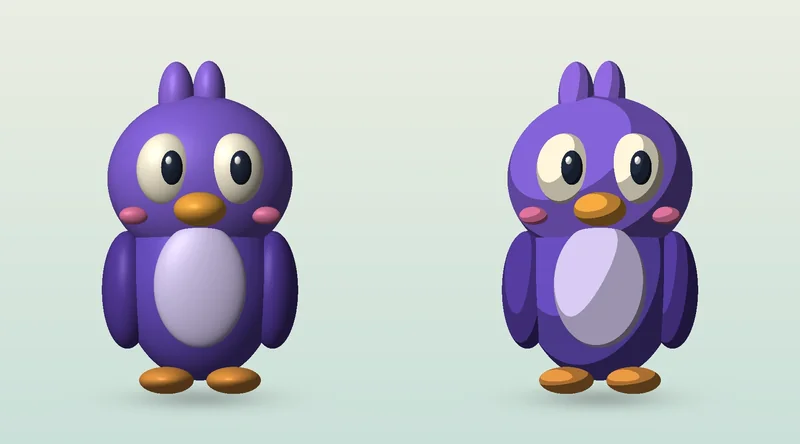
The cover shows the same original character, geometry, viewpoint and light direction twice. The left version uses a continuous diffuse lighting response with a soft specular highlight. The right version groups the diffuse response into three tones and removes that smooth highlight. The change is in the shading; the character has not become a flat drawing.
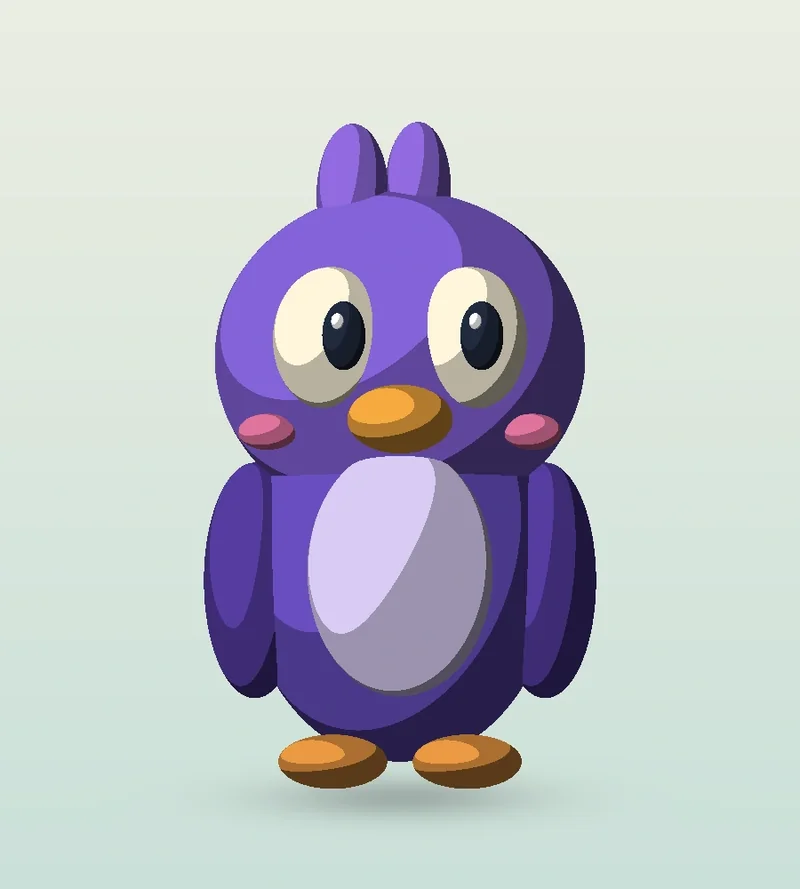
This original demonstration uses simple ellipsoid geometry and directional lighting. It illustrates the principle, not a complete production shader or a client project.
Look at the cheek, forehead and belly rather than only the outline. In the banded version, each region stays comparatively uniform until a threshold is crossed. The shadow boundary becomes a designed shape. More bands can describe more volume; fewer bands can produce a stronger graphic treatment. Neither choice is automatically better: the useful question is whether the face and action remain readable.
How cel shading works
In a simple setup, a surface facing a light receives a different lighting value from a surface turned away. A toon shader remaps that response into selected colours or tonal levels. A ramp can define where the bright, middle and dark regions begin, and whether transitions are sharp or softened.
This is more controllable than applying a posterisation effect to a finished image. A material-level treatment can respond to the model’s surface orientation and scene lights. A screen-space effect can also contribute to a stylised result, but it works with a different set of information. Ask which parts of the look are generated in the material, which are drawn or textured, and which are added in compositing.
Autodesk’s Arnold Base Toon documentation provides a practical example: a ramp connected to the base tonemap can create a cel-like response, and changing the lighting changes the appearance. A successful style therefore depends on lighting and materials being developed together.
Outlines are a separate design choice
A black border is not what makes an image cel shaded. A character can have stepped shadow regions with no outline, or bold outlines with smoothly shaded surfaces. These treatments are often combined, which makes them easy to confuse.
The demonstration’s silhouette option adds only an outer contour. Production line systems may also describe creases, intersections or selected internal features. A uniform line around everything can make small facial details heavy, so line weight, visibility and colour need deliberate choices. The Arnold edge controls illustrate that lines can be treated separately from the surface response.
Lighting also needs restraint. Extra lights may split the face into distracting patches or weaken a planned shadow shape. Start by checking the face in the approved key light, then introduce fill, rim and environment contributions where they serve the composition. A bright still frame is not enough: inspect the same choices while the head turns and the character changes expression.
Cel shading, toon shading and hybrid animation
Toon shading is often used as a broader term for cartoon-oriented surface treatments. Cel shading usually points more specifically to simplified colour regions and stepped tonal transitions. Studios and software packages use these labels differently, so a visual reference and test shot are more precise than the label alone.
Cel animation is a different term. It refers to the traditional technique of photographing artwork on transparent cels, usually over backgrounds. A cel-shaded 3D render does not require physical cels. Likewise, the common spelling “cell shading” usually refers to cel shading, rather than a separate technique.
Hybrid animation combines approaches or elements. A production might combine cel-shaded 3D characters with drawn effects, but cel shading by itself does not prove that both 2D and 3D animation were used. Read our hybrid animation guide for that wider production question. 2.5D animation addresses another issue: creating depth with layered artwork and related techniques.
Why the character and performance still matter
A shader cannot repair an unclear silhouette, an awkward expression or poorly staged action. Simplified shading can make these problems more noticeable because there is less surface detail to disguise them. Plan large, readable shapes before refining small highlights.
For a face, test whether eyes, brows and mouth remain distinct in both lit and shaded regions. A shadow boundary crossing the mouth may change how an expression reads. Hair needs a similar check: too many small clumps can produce busy patterns, while a few designed masses may suit the chosen treatment.
Our shape-language guide explains how forms support readability. When preparing a 3D character design, include the intended shading treatment early enough to influence those forms. Performance remains its own task: timing, poses and expression need direction whether the final surface looks drawn, painted or dimensional.
A useful cel-shading production test
- Define the visual rules. Choose references for colour grouping, shadow edges and line treatment. Explain what should remain consistent across shots.
- Use a representative model. Include the face, hair or costume features that are most likely to challenge the look. A sphere alone cannot reveal facial shading problems.
- Approve a small lighting setup. Establish the palette and material response together. Record the light conditions used for the approved frame.
- Test movement. Include a head turn, an expression change and the most important camera move. Watch for distracting changes in shadow regions and line thickness.
- Check the delivery size. Review at the intended screen resolution and in a compressed export. Thin lines and tiny tonal regions may become unstable or disappear.
- Agree the production boundaries. Establish which adjustments can be reused and which shots need individual art direction before expanding the sequence.
This fits into the wider 3D animation pipeline. The objective is an approved moving example that the team can reproduce, rather than a beautiful frame whose appearance breaks in the next shot.
When to use cel shading—and when to reconsider
Cel shading is worth exploring when a project needs a graphic character treatment, controlled shadow shapes or a closer visual relationship with illustration. It can support films, series, brand characters and interactive work. Suitability depends on the specific art direction, action and delivery environment, not the audience’s age.
It needs additional thought when subtle surface changes are essential, when the character must sit convincingly in photographic footage, or when uncontrolled lighting is part of an interactive experience. These requirements do not rule it out, but they belong in the test rather than being discovered near delivery.
Do not assume a flatter image is automatically cheaper or faster to produce. Modeling, rigging and acting may still be required, and custom line systems or shot-specific shading adjustments can add work. Compare the same scope, runtime, camera requirements and revision process when evaluating options.
Software choices and a clear brief
Blender and Arnold offer routes to toon rendering, but a shader setup does not transfer unchanged between render engines. Blender’s documented Toon BSDF is a Cycles option; its Shader to RGB workflow is associated with EEVEE. Check the documentation for the renderer and version your team will actually use. This guide explains the visual decisions rather than prescribing a version-specific node recipe.
For a film or campaign, include the intended colour treatment, line references, key actions and output formats in the brief. For game and interactive characters, also specify the target engine, devices, lighting conditions and performance constraints. An offline test render does not establish that the same result will work in real time.
When discussing character animation, ask for one representative shot that demonstrates both the performance and the shading. Our animation brief checklist can help turn a visual reference into concrete production requirements.
Compare the treatment under movement
The smooth-versus-banded example above isolates one shading choice. A production test needs movement as well: rotate the character, change the light and review an expression at the intended screen size. These are proposed checks, not results from a client production.
Keep the model; change the light response
Compare continuous tones with a small number of colour bands on the same geometry, camera and lighting setup. Then decide whether the bands should remain tied to the lighting or be art-directed for particular shots. A pleasing still does not establish stable shadow shapes through a turn.
Keep the shading; compare outlines separately
Test the image with and without lines. Check silhouette thickness at close and distant camera positions, small facial details and overlapping limbs. Outlines can disappear, merge or become too heavy at delivery size. They are a separate decision from the colour bands and should not be added solely because a reference is called “toon.”
Keep the look; test the performance
A cel-shaded model still needs poses, deformation and timing that suit the character. The shader does not create drawn acting. If the desired result includes hand-drawn accents or replacement animation, investigate a hybrid workflow. If only the background needs layered depth, 2.5D staging may be enough for that part of the scene.
Rendered film or interactive asset?
Rendered film: approve the look across the actual shot sequence, including lighting changes, line treatment and final-size exports. A look can be adjusted for an individual camera, but that adjustment may not work for a different view.
Game or app: test the materials in the target engine on representative devices, across the allowed cameras and lighting conditions. A shader that works in an offline scene is not automatically portable. Agree the engine version, material restrictions, performance targets and who handles integration.
For film performance, explore 3D character animation. If model proportions and surface design are still being developed, see character design and modeling. For runtime delivery, use game and interactive character production to frame the technical brief.
Share a reference for your character’s look, together with a motion example, the intended film or engine, existing assets, target date and budget range. Specify what matters: shadow shapes, palette, lines, texture, acting or a combination. That gives the team concrete choices to test.
Frequently asked questions
Is cel shading 2D or 3D?
In a 3D workflow, cel shading changes how a model is rendered, not its underlying volume. The result can look drawn while still using 3D geometry, lighting and animation. Artists also use the term for hard-edged shading in 2D illustration.
Does cel shading need black outlines?
No. Distinct tonal regions can create a cel-shaded appearance without outlines. Contours are a separate design choice and can use different colours or thicknesses.
Is toon shading the same as cel shading?
The terms overlap. Toon shading often covers a wider range of cartoon surface treatments, while cel shading commonly refers to flatter colour regions and stepped light-to-shadow transitions.
Does cel shading make animation cheaper?
Not automatically. The project can still need modeling, rigging, acting and rendering, with additional work for lines and controlled shadow shapes. Cost depends on the agreed shots and workflow.
Can an existing 3D character be cel shaded?
Often, but the model, textures, normals, facial features and rig should be tested in the proposed treatment. A material change alone may not achieve the desired graphic look.
Conclusion: design the look in motion
Cel shading is a way to organise the image: clear colour regions, intentional shadow shapes and, where useful, controlled lines. Its success depends on the model, lighting and performance working together across a sequence.
Start with a representative moving test and judge it at the intended delivery size. Explore the animation styles library to compare approaches, or send Mimic Cartoon your character references and production brief to discuss a suitable direction.