A beautiful model needs controls that let its personality move. We plan character rigs around the poses, expressions and production demands they must support.
Character rigging connects a 3D model to the skeleton, deformation systems and controls used by animators. Mimic Cartoon scopes body and facial rigging for cartoon performances, including skinning, expression controls and movement tests. The rig is planned around the character’s anatomy, animation style and target software. Real-time delivery requires a separate check of engine and export constraints.
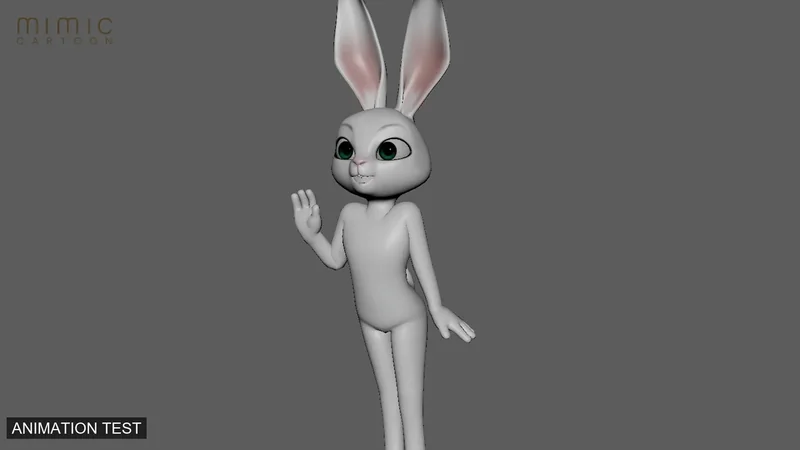
Plan the skeleton and animator controls around the required actions: walking, reaching, sitting or exaggerated cartoon poses. A creature’s tail, ears, wings or extra limbs need their own movement decisions, not a human rig applied without review.
02 / THE CRAFT
Facial rigging & expressions
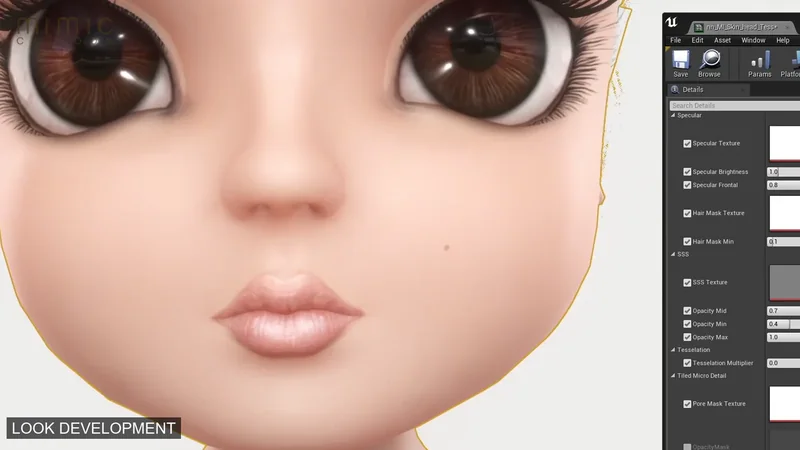
Eyes, lids, brows, jaw and mouth controls support the intended expression range. Blend shapes, joints or a combination can be used depending on the brief. Dialogue requirements and close-up camera work influence the level of facial detail.
03 / THE CRAFT
Skinning & deformation testing
Skin weights determine how the surface follows the skeleton. We test representative and demanding poses to identify pinching, lost volume or unwanted intersections. The useful test is how the character performs, not simply whether controls exist.
Start with the poses.Define the movement range the character needs before planning its controls.
A USEFUL DISTINCTION
A rig is the system used to create animation; it is not the finished performance. A native animation rig may use controls or deformers that do not transfer directly through an interchange file. Confirm the receiving software and export requirements before the rig is built.
CLEAR DECISIONS. BETTER PRODUCTION.
From the first conversation to the final handoff.
01
Review the model
Check topology, scale, neutral pose and dependencies. Agree the software version, required actions, facial range and handoff destination.
02
Build the controls
Set up the body and agreed facial systems. Keep animator usability and the character’s proportions central to the control design.
03
Test in motion
Run a pose and expression checklist, then a short movement test. Resolve deformation issues before the rig is used across many shots.
04
Document & hand over
Package the rig with usage notes and agreed examples. Check an export or receiving scene when cross-pipeline delivery is part of the brief.
DEFINE THE DESTINATION
Know what you’re receiving.
Choose the parts your production needs. The final deliverable list, technical specifications and source-file requirements are agreed in your brief.
Body & facial systems
The agreed skeleton, skinning and animation controls, with facial shapes or controls appropriate to the performance.
Pose & expression tests
Review evidence showing how the rig behaves in the required movement range and key expressions.
Production handoff
Compatible files, control notes and known dependencies. Engine exports and retargeting support are separately specified.
Built for the close-up.Facial controls must preserve the character’s identity through changing expressions.
LOOK BEYOND THE STILL IMAGE
The performance is the test.
Our showreel brings character development and finished performances together. For a rigging brief, discuss the specific pose, expression and export tests your animators will need.
Rigging effort depends on anatomy, facial complexity, deformation quality, the movement range and delivery environment. Existing topology may need changes before rigging begins. A hero character for close-ups and a small background character usually need different control and testing priorities.
YOUR QUESTIONS, ANSWERED
Character Rigging & Facial Rigging FAQs
A few useful answers before your character’s first scene.
Q / 01
Can you rig an existing 3D model?
Yes, after reviewing its topology, scale and intended movement. Models created only for still renders may need geometry changes before they can deform well. We identify those requirements before confirming the rigging scope.
Q / 02
What is facial rigging?
Facial rigging creates controls for expressions and speech-related movement. It may combine joints and blend shapes for features such as brows, eyelids, cheeks and the mouth. The required expression range determines the setup.
Q / 03
What is the difference between rigging and skinning?
Rigging creates the overall control and deformation system. Skinning binds the model to the skeleton and defines how its vertices respond to joint movement. Skinning is one part of building a working character rig.
Q / 04
Will a film rig work in a game engine?
Not automatically. Engine-ready delivery may require a simplified skeleton, supported morph targets and baked animation. We agree the target engine, version and technical limits and test the required export as part of the scope.
Q / 05
Can a rig support motion capture?
It can be designed for suitable retargeting, but captured motion still needs adaptation for stylized proportions and performance. Share the capture source and skeleton requirements before rigging so compatibility can be assessed.
Q / 06
How do you check that a rig is ready?
We use agreed pose, deformation and expression tests, followed by representative animation. The review should check animator controls, movement quality and the intended handoff. Approval is based on the character’s actual requirements.